Here's how you cut and paste text into a Wordpress post without inserting gobbldygook code at the same time.
The screencast can take a while to load, so it is easier to:
1. Press the play button
2. Pause the playback while it downloads, then;
3. press play when you have the whole screencast downloaded.
Tuesday, November 11, 2008

Thursday, November 6, 2008
Things 9 and 10
I find Google docs extremely useful to store my travel itineraries. I can print them out to carry with me, always have an online copy to check details and times. I share them with my husband so he knows where I am at any time. If I am going to lots of places on a trip, I will create a google map too so I can check where I will be.
I use PBwiki extensively for work projects and things like the WA Library Unconference. I should get around to creating a MediaWiki installation on the webhosting I have for work , but I find that it is easier to have separate wikis that other people can "own" as much as I do. I do use the backup facility for PBwiki to ensure the data is safe - as I don't like the idea that if PBwiki company goes under, then I lose my data :(
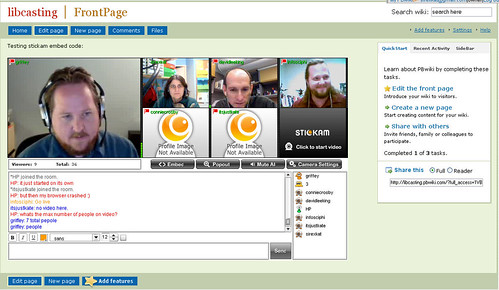
I also like using the original version of PBwiki as a place to experiment with what is produced by the embed code from other web services. For example, I was playing with Stickam, video conferencing site with a mob of other librarians when I noticed we could embed our live output - so I whacked Jason Griffey's channel into a PBwiki wiki: Libcasting. When we were live, it looked like this:
I use PBwiki extensively for work projects and things like the WA Library Unconference. I should get around to creating a MediaWiki installation on the webhosting I have for work , but I find that it is easier to have separate wikis that other people can "own" as much as I do. I do use the backup facility for PBwiki to ensure the data is safe - as I don't like the idea that if PBwiki company goes under, then I lose my data :(
I also like using the original version of PBwiki as a place to experiment with what is produced by the embed code from other web services. For example, I was playing with Stickam, video conferencing site with a mob of other librarians when I noticed we could embed our live output - so I whacked Jason Griffey's channel into a PBwiki wiki: Libcasting. When we were live, it looked like this:
Thursday, October 30, 2008
week 3: Thing 7 and 8 - Firefox
I still use Internet Explorer to read my Outlook Webmail from home as - suspiciously - this Microsoft product only works properly with the Microsoft reader.
The major Firefox extensions I use are:
- Colourful tabs - which makes each tab display in a different colour
- Del.icio.us toolbar - lets me tag things instantly for upload to del.icio.us
- Evernote web clipper - lets me upload almost anything as a "note" in my private notes database
- Greasemonkey - allows me to run a number of little useful scripts that do other things
- Meebo - instant messaging
- OpenURL referrer - from OCLC - I was fiddling with it for the Web Presence project
- Remember the Milk for gmail - puts a "to do" list into my gmail account
- Ubiquity - I press [CTRL] [SPACE] and a command line appears, allowing me to just type a command and look up something on wikipedia or sent a message to twitter or something to gmail, all from one spot
- Zotero - see Thing 8
Thursday, October 23, 2008
Week 2 Thing 6 - RSS feeds
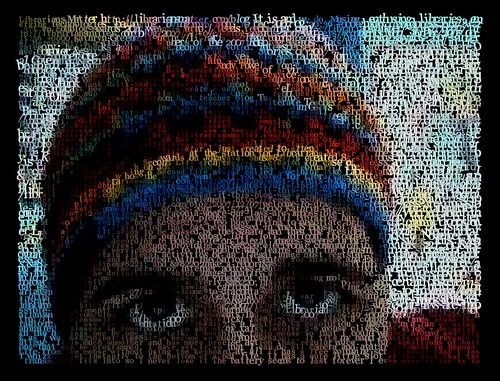
The feed that I subscribed to this week was Dave Pattern's photograph feed on Flickr. Dave works in the library at the University of Huddersfield and creates very beautiful data visualisations based on things like book covers and the number of hits on particular terms on the OPAC.
He also illusatrates how RSS can be used in creative ways. Check out this "portrait" he created in coloured words taken straight from my RSS feed: kg_001

There are more portraits of librarians in this set here: In their own words....
Dave explains how he did it on this post: Librarians - in their own words .
He also illusatrates how RSS can be used in creative ways. Check out this "portrait" he created in coloured words taken straight from my RSS feed: kg_001
There are more portraits of librarians in this set here: In their own words....
Dave explains how he did it on this post: Librarians - in their own words .
Wednesday, October 22, 2008
Why am I trying to use video in my 23 Things Blog ?
This exchange between me and Connie Crosby on seesmic explains why. Connie had just conducted a workshop about video etc at Internet Librarian 2008 and was questioning why she doesn't tell more stories using video. I replied telling her about how I find it hard to socially find a way to ask people to talk to my video camera - but I want to learn how to do it. She answers with her experience with trying to get people on her podcast - suggesting that after hearing Howard Rheingold keynote the conference - there are new literacy skills involving knowing how to talk into a video camera, how to create movies.

23 Things Week One - the video
Here is my 23 Things Week One video. I've used seesmic, which is usually a post and reply kind of site, not a "record things for embedding" site - so I hope the users are OK with it:
Monday, October 20, 2008
THINGS 1, 2, 3, 4 and 5
THING 1: I've read the "About" and "Timetable" pages - heck I wrote them, so I should know what they say.
THING 2:
Lifelong learning habit that is easiest for me - probably playing, followed closely by teaching/mentoring others. Sounds really corny but I find that whenever I teach people something, I often learn more about it than I would with independent learning. Others can ask questions or suggest an approach that I often haven't thought of. I like that.
Lifelong learning habit that is hardest for me - beginning with an end in mind. I like it when my learning meanders and takes me places I didn't expect. I like learning for learning's sake, and as part of an overall process...so often just jump in without a goal.
My goals for this 23 Things session
* To learn more about how other people learn
* To help others grow and develop their skills in teaching and presentation
* To learn from my colleagues
* To do every Thing as quickly as possible after it is published so I have an idea of what participants are going through
* To use unusual publishing tools to create pretty embeddable graphics and movies in my blog posts.
What I need in my learning toolkit
* Moderation - I need to do this to the best of my ability but balance it with other commitments
* Patience to support other people who are doing for the first time what I have done oodles of time before
* Some groovy graphics and some nice publishing tools.
* Webcam
THING 3
My gmail address, if anyone wants to know is: libkat(at)gmail.com
THING 4
Here's the blog.
THING 5
Just about to tick off these things now.
THING 2:
Lifelong learning habit that is easiest for me - probably playing, followed closely by teaching/mentoring others. Sounds really corny but I find that whenever I teach people something, I often learn more about it than I would with independent learning. Others can ask questions or suggest an approach that I often haven't thought of. I like that.
Lifelong learning habit that is hardest for me - beginning with an end in mind. I like it when my learning meanders and takes me places I didn't expect. I like learning for learning's sake, and as part of an overall process...so often just jump in without a goal.
My goals for this 23 Things session
* To learn more about how other people learn
* To help others grow and develop their skills in teaching and presentation
* To learn from my colleagues
* To do every Thing as quickly as possible after it is published so I have an idea of what participants are going through
* To use unusual publishing tools to create pretty embeddable graphics and movies in my blog posts.
What I need in my learning toolkit
* Moderation - I need to do this to the best of my ability but balance it with other commitments
* Patience to support other people who are doing for the first time what I have done oodles of time before
* Some groovy graphics and some nice publishing tools.
* Webcam
THING 3
My gmail address, if anyone wants to know is: libkat(at)gmail.com
THING 4
Here's the blog.
THING 5
Just about to tick off these things now.
Subscribe to:
Posts (Atom)
