Thursday, October 30, 2008

week 3: Thing 7 and 8 - Firefox


I have been using Firefox and extensions for quite a while now. It's ironic, I'm using google's chrome browser to make this post :) It is much lighter-weight and requires less processing from the PC, so I use it for reading. It's not so great for editing, so I tend to edit things in Firefox.

I still use Internet Explorer to read my Outlook Webmail from home as - suspiciously - this Microsoft product only works properly with the Microsoft reader.

The major Firefox extensions I use are:
  • Colourful tabs - which makes each tab display in a different colour
  • Del.icio.us toolbar - lets me tag things instantly for upload to del.icio.us
  • Evernote web clipper - lets me upload almost anything as a "note" in my private notes database
  • Greasemonkey - allows me to run a number of little useful scripts that do other things
  • Meebo - instant messaging
  • OpenURL referrer - from OCLC - I was fiddling with it for the Web Presence project
  • Remember the Milk for gmail - puts a "to do" list into my gmail account
  • Ubiquity - I press [CTRL] [SPACE] and a command line appears, allowing me to just type a command and look up something on wikipedia or sent a message to twitter or something to gmail, all from one spot
  • Zotero - see Thing 8

Thursday, October 23, 2008

Week 2 Thing 6 - RSS feeds

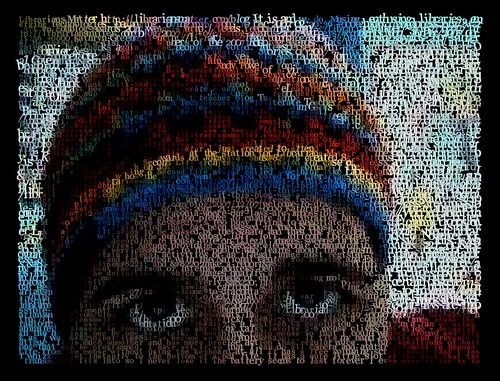
The feed that I subscribed to this week was Dave Pattern's photograph feed on Flickr. Dave works in the library at the University of Huddersfield and creates very beautiful data visualisations based on things like book covers and the number of hits on particular terms on the OPAC.

He also illusatrates how RSS can be used in creative ways. Check out this "portrait" he created in coloured words taken straight from my RSS feed: kg_001


There are more portraits of librarians in this set here: In their own words....

Dave explains how he did it on this post: Librarians - in their own words .

Wednesday, October 22, 2008

Why am I trying to use video in my 23 Things Blog ?

This exchange between me and Connie Crosby on seesmic explains why. Connie had just conducted a workshop about video etc at Internet Librarian 2008 and was questioning why she doesn't tell more stories using video. I replied telling her about how I find it hard to socially find a way to ask people to talk to my video camera - but I want to learn how to do it. She answers with her experience with trying to get people on her podcast - suggesting that after hearing Howard Rheingold keynote the conference - there are new literacy skills involving knowing how to talk into a video camera, how to create movies.

Internet Librarian - Connie's Day 2 Wrap-upConnie talks about being newly inspired at Internet Librarian. Check out http://www.shanachietour.com for more info.

23 Things Week One - the video

Here is my 23 Things Week One video. I've used seesmic, which is usually a post and reply kind of site, not a "record things for embedding" site - so I hope the users are OK with it:

23 Things Week OneI'm running a 23 Things programme in my library. I'm also participating. I've decided that I'll experiement with making my blog posts using video and other graphic tools

Monday, October 20, 2008

THINGS 1, 2, 3, 4 and 5

THING 1: I've read the "About" and "Timetable" pages - heck I wrote them, so I should know what they say.

THING 2:
Lifelong learning habit that is easiest for me - probably playing, followed closely by teaching/mentoring others. Sounds really corny but I find that whenever I teach people something, I often learn more about it than I would with independent learning. Others can ask questions or suggest an approach that I often haven't thought of. I like that.

Lifelong learning habit that is hardest for me - beginning with an end in mind. I like it when my learning meanders and takes me places I didn't expect. I like learning for learning's sake, and as part of an overall process...so often just jump in without a goal.

My goals for this 23 Things session
* To learn more about how other people learn
* To help others grow and develop their skills in teaching and presentation
* To learn from my colleagues
* To do every Thing as quickly as possible after it is published so I have an idea of what participants are going through
* To use unusual publishing tools to create pretty embeddable graphics and movies in my blog posts.

What I need in my learning toolkit
* Moderation - I need to do this to the best of my ability but balance it with other commitments
* Patience to support other people who are doing for the first time what I have done oodles of time before
* Some groovy graphics and some nice publishing tools.
* Webcam


THING 3
My gmail address, if anyone wants to know is: libkat(at)gmail.com

THING 4
Here's the blog.

THING 5
Just about to tick off these things now.

Friday, May 30, 2008

Testing Blip.tv embedding

Let's just see what this screencast looks like when embedded. Can you read the text? Is the sound quality OK?


Monday, December 10, 2007

Brown bag lunch

Irene and I are talking about our travels on Tuesday 18th at 1pm and I wanted a spot to place some useful links.

The events I visited were:

The presentations I gave were:

Bits and pieces I picked up:

Overall theme from all events - libraries are trying to use the tools that users are already using, (eg. google docs, CE6 ) and integrate library content into these.

QULOC and TAFE followed similar format - presentations to everyone before lunch, break into smaller groups after lunch. QULOC's focus on hands on workshops was great. The unconference was less formal than the WA unconference, with many sessions being "sit around and talk" sessions. Like WA, it was a useful sharing of information across library sectors.

QUT Creative Industries have use delicious tag cloud embedded into a web page as subject guide - and have embedded this into Blackboard / CE6 Learning Management System

Yarra Plenty Library System incorporates LibraryThing tags in its catalogue. See this example for Tim Winton's Cloudstreet.

QULOC

University of New England - received funding to create a social network for students, but beginning to conclude that it is not necessarily a case of "If you build it they will come". May be better to use an Open Source network or to tap into something pre-exisiting like Facebook - especially by making widgets to tap into this. Cameron Barne's presentation slides are here,:

Gina Velli is a young librarian working in legal deposit at the State Library of Queensland. She gave a presentation about MySpace / Facebook and concluded that MySpace is not what it once was and Facebook is preferred by more mature library users.

Andrew Bennett from UQ talked about using Web 2.0 tools as part of the IT Standard Operating Environment, citing the advantages of single sign-on, standardisation of tools, "light-weight accesss to heavy weight tools". Disadvantages - bakups and repository, scalability. **. Focussed on Zoho and Google docs.

Unconference

I went to those sessions I was most unfamiliar with at the unconference - so learned about how to offer services to youth, and a bit more about using chat reference.

TAFE -

Deb and Pim also presented about the Learning Common.

UWA Library have integrated their information literacy into Blackboard / CE6, but wanted to ensure their course content was more portable. At the moment it is very hard to reuse material from course to course. They are experimenting with using HIVE to store learning objects that can be access from different learning modules.

Kay Schneider's igoogle presentation was excellent.

Jody ex-Curtin's "start with google" information literacy classes. Demonstrated a search on google giving tips about using the + and site: operators. Then took same search to google scholar. Then went from google scholar into library databases...all the time talking about accessability, search strategies and academic validity of the sources.

IRENE
The event she attended and presented about at the Brown Bag Lunch is the Learning Futures Symposium .