Here they are, the results of mixing a group of librarians and Viddler.
Thing 21 workshop. Murdoch University Library. 9 December 2008
Thing 21 workshop. Murdoch University Library. 12 December 2008
Thing 21 workshop. Singing Librarians Murdoch University Library. 12 December 2008
Thursday, December 11, 2008

Sunday, November 30, 2008
Playing with a Twitter Client - Twhirl
This week I'm using the 23 Things as an excuse to play with using a Twitter Client.

Earlier this year I used Flowgram to make a little history of microblogging where I talked about the different products that tried to fill twitter's niche and the different tools to use with Twitter, Adventures in Microblogging . Flowgram is an online screencast making tool, with the difference being that the user can interact live with all the screens shown.
In the Flowgram, I mentioned that I hadn't had much time for Twitter Clients - that is pieces of software that let you access twitter without using a web browser, and allow you to do much more fancy things when you post or read tweets. The 23 Things is an excellent time to test my "tried it but didn't like it" prejudice.

Earlier this year I used Flowgram to make a little history of microblogging where I talked about the different products that tried to fill twitter's niche and the different tools to use with Twitter, Adventures in Microblogging . Flowgram is an online screencast making tool, with the difference being that the user can interact live with all the screens shown.
In the Flowgram, I mentioned that I hadn't had much time for Twitter Clients - that is pieces of software that let you access twitter without using a web browser, and allow you to do much more fancy things when you post or read tweets. The 23 Things is an excellent time to test my "tried it but didn't like it" prejudice.
Thursday, November 27, 2008
Twitter and Facebook
I use Facebook because I have to understand it for work. I don't use it to keep tabs on what my friends - real or imaginary - are doing. I have used it to send casual messages to "friends" that I would otherwise be too timid to email officially. Very occasionally I will use the chat function if someone I know is on at the same time.
Twitter has changed my life. I am on it almost constantly. It keeps me in touch with librarians all over the world, the Perth web community and international social media specialists. I have found a cleaner, obtained birthday entertainment for one of my children, get useful links pushed out each day, watched over twenty international conferences via the tweet streams of my friends, vented, sympathised, been incredibly silly and become up to speed with all sorts of random issues that later I discover are very useful.
I have embedded a twitter badge for my work twitter account in my work blog. It tells people when I am on campus and how to contact me each week.
I love this slideshare set that was created by Michael Sauers when some of my librarian friends tried to explain what Twitter is like ...
Twitter has changed my life. I am on it almost constantly. It keeps me in touch with librarians all over the world, the Perth web community and international social media specialists. I have found a cleaner, obtained birthday entertainment for one of my children, get useful links pushed out each day, watched over twenty international conferences via the tweet streams of my friends, vented, sympathised, been incredibly silly and become up to speed with all sorts of random issues that later I discover are very useful.
I have embedded a twitter badge for my work twitter account in my work blog. It tells people when I am on campus and how to contact me each week.
I love this slideshare set that was created by Michael Sauers when some of my librarian friends tried to explain what Twitter is like ...

Thursday, November 20, 2008
Things 13, 14, and 15
I joined Flickr when we first started the MULTA project back in June 2006. Since then, I have uploaded 572, but 387 have been this year - and 174 since the start of the month.
I'm using it more and more as a public diary, and a social tool and having much more conversation with others using Flickr.
One of my favourite photos from the last month is this one from the kids' section of the Botany library in Auckland:

My most frivolous set is the Minifigs go travelling (Set). My sons each gave me a minifig (lego person) to take with me on my travels. They were very helpful. I'm taking photos so the boys can see what their minifigs have been up to.
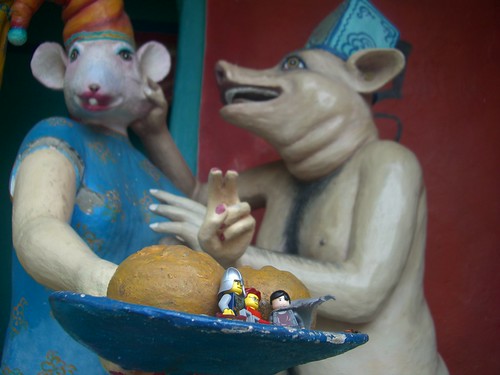
I also contribute to theLibrarian Shoes (Pool).

I think that using Friendfeed has made me use Flickr more, as I keep seeing fabulous photos in the feeds from my contacts and then friending them on Flickr.
For my image generator this week, I went to the Generator blog recommended in Amanda's post and chose the (product name) baby generating site . I gave it a photo of my husband and me from which to create a baby. It is a nifty way to advertise a product that I am sure you will be able to guess from the results below. Click on the mouth and it makes baby noises....


I'm using it more and more as a public diary, and a social tool and having much more conversation with others using Flickr.
One of my favourite photos from the last month is this one from the kids' section of the Botany library in Auckland:

My most frivolous set is the Minifigs go travelling (Set). My sons each gave me a minifig (lego person) to take with me on my travels. They were very helpful. I'm taking photos so the boys can see what their minifigs have been up to.
I also contribute to theLibrarian Shoes (Pool).
I think that using Friendfeed has made me use Flickr more, as I keep seeing fabulous photos in the feeds from my contacts and then friending them on Flickr.
For my image generator this week, I went to the Generator blog recommended in Amanda's post and chose the (product name) baby generating site . I gave it a photo of my husband and me from which to create a baby. It is a nifty way to advertise a product that I am sure you will be able to guess from the results below. Click on the mouth and it makes baby noises....
Thursday, November 13, 2008
Thing 11 and 12
THING 11
I did my searches on the term "cerebral palsy". Most people (I would hope) would use more than one term and narrow down the aspect they are searching for.
I found that:
I did my searches on the term "cerebral palsy". Most people (I would hope) would use more than one term and narrow down the aspect they are searching for.
I found that:
• del.icio.us Was a rather blunt instrument, although much of the focus was on childhood cerebral palsy and family issues, which I'm most interested in.
• Connotea Retrieved "popular" scholarly articles of the soft education, general overview kinds, rather than hard scientific medical studies
• CiteULike Retrieved scholarly articles with much more medical focus.
• Murdoch University Library catalogue subject search A list of LCSH subject headings
• http://www.library.uq.edu.au/ Book records, faceted searches, a tag cloud and enough to make me feel there were threads to follow to get to exactly what I wanted.
• google Wikipedia entry first and then Australian entries. - because google knows who I am and where I am. The ads on the left hand side always annoy me - although I'm not sure there are any searchers who are naive enough to believe they are actual search results.
zuula - I like the ability to pick the search engine, but again a rather blunt instrument.
• kartoo - I'm a very visual learner and I find this suits my style really well. I find it very easy to narrow down the search and find exactly what I wanted - even finding suggested topics that I hadn't realised I want via serendipity. Do I use this in my everyday life? Nope. Maybe I should.
Thing 12
I have been using delicious for a couple of years now - and I use it almost daily. Unfortunately I use like I used photocopying when I was a student .... I presume that if I use delicious I will actually read or go back to the items linked there. I never do really...but I live in hope...
I added 23katethings to my network. I can see this working for groups of teachers sharing their resources. I tend to use Friendfeed to pick up links from my friends on delicious.
I did discover when I did this that I have 9 fans - and real people that I know - but I'm wondering whether it should fan them back, and what the point would be...
Video and voice in gtalk via gmail
Yup. Video and voice are now integrated into gtalk in gmail - but not yet via the gtalk stand alone client. A Skype-killer I would think?
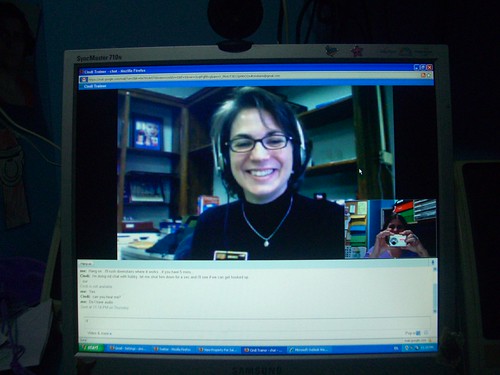
Cindi-cam via gtalk in gmail Uploaded to Flickr on November 13, 2008 by sirexkat
I remember going to the Science and Technology discovery centre (Scitech) 15 years ago and seeing an “amaaazing” and expensive device to allow video telephone calls - with a screen refresh rate of about 10 frames per minute.

google video chat w/kathryn Uploaded to Flickr on November 14, 2008 by cindiann
As Cindi pointed out, all it needs now is screen and ap sharing functionality….and it’s still useful how you can do this in a window while working on a google doc together …. or anything else. Me? I want to see split screen conference calling so you can have three or four people video conferencing at once.
Do like.
Tuesday, November 11, 2008
Pasting into wordpress without getting gobbldygook code
Here's how you cut and paste text into a Wordpress post without inserting gobbldygook code at the same time.
The screencast can take a while to load, so it is easier to:
1. Press the play button
2. Pause the playback while it downloads, then;
3. press play when you have the whole screencast downloaded.
The screencast can take a while to load, so it is easier to:
1. Press the play button
2. Pause the playback while it downloads, then;
3. press play when you have the whole screencast downloaded.
Thursday, November 6, 2008
Things 9 and 10
I find Google docs extremely useful to store my travel itineraries. I can print them out to carry with me, always have an online copy to check details and times. I share them with my husband so he knows where I am at any time. If I am going to lots of places on a trip, I will create a google map too so I can check where I will be.
I use PBwiki extensively for work projects and things like the WA Library Unconference. I should get around to creating a MediaWiki installation on the webhosting I have for work , but I find that it is easier to have separate wikis that other people can "own" as much as I do. I do use the backup facility for PBwiki to ensure the data is safe - as I don't like the idea that if PBwiki company goes under, then I lose my data :(
I also like using the original version of PBwiki as a place to experiment with what is produced by the embed code from other web services. For example, I was playing with Stickam, video conferencing site with a mob of other librarians when I noticed we could embed our live output - so I whacked Jason Griffey's channel into a PBwiki wiki: Libcasting. When we were live, it looked like this: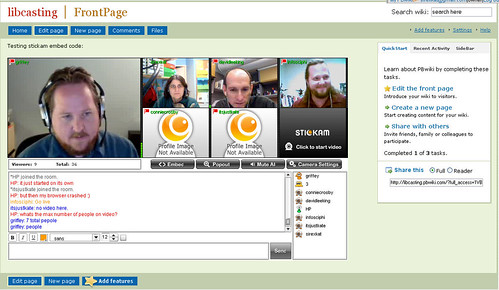
I use PBwiki extensively for work projects and things like the WA Library Unconference. I should get around to creating a MediaWiki installation on the webhosting I have for work , but I find that it is easier to have separate wikis that other people can "own" as much as I do. I do use the backup facility for PBwiki to ensure the data is safe - as I don't like the idea that if PBwiki company goes under, then I lose my data :(
I also like using the original version of PBwiki as a place to experiment with what is produced by the embed code from other web services. For example, I was playing with Stickam, video conferencing site with a mob of other librarians when I noticed we could embed our live output - so I whacked Jason Griffey's channel into a PBwiki wiki: Libcasting. When we were live, it looked like this:
Thursday, October 30, 2008
week 3: Thing 7 and 8 - Firefox
I still use Internet Explorer to read my Outlook Webmail from home as - suspiciously - this Microsoft product only works properly with the Microsoft reader.
The major Firefox extensions I use are:
- Colourful tabs - which makes each tab display in a different colour
- Del.icio.us toolbar - lets me tag things instantly for upload to del.icio.us
- Evernote web clipper - lets me upload almost anything as a "note" in my private notes database
- Greasemonkey - allows me to run a number of little useful scripts that do other things
- Meebo - instant messaging
- OpenURL referrer - from OCLC - I was fiddling with it for the Web Presence project
- Remember the Milk for gmail - puts a "to do" list into my gmail account
- Ubiquity - I press [CTRL] [SPACE] and a command line appears, allowing me to just type a command and look up something on wikipedia or sent a message to twitter or something to gmail, all from one spot
- Zotero - see Thing 8
Thursday, October 23, 2008
Week 2 Thing 6 - RSS feeds
The feed that I subscribed to this week was Dave Pattern's photograph feed on Flickr. Dave works in the library at the University of Huddersfield and creates very beautiful data visualisations based on things like book covers and the number of hits on particular terms on the OPAC.
He also illusatrates how RSS can be used in creative ways. Check out this "portrait" he created in coloured words taken straight from my RSS feed: kg_001
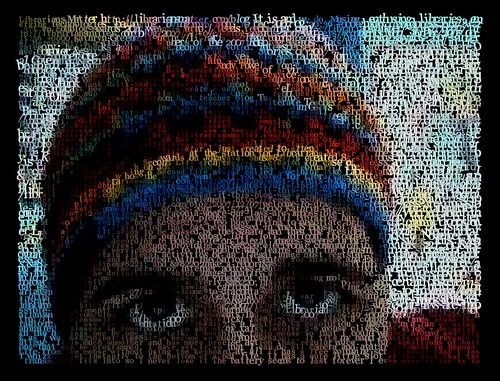
There are more portraits of librarians in this set here: In their own words....
Dave explains how he did it on this post: Librarians - in their own words .
He also illusatrates how RSS can be used in creative ways. Check out this "portrait" he created in coloured words taken straight from my RSS feed: kg_001
There are more portraits of librarians in this set here: In their own words....
Dave explains how he did it on this post: Librarians - in their own words .
Wednesday, October 22, 2008
Why am I trying to use video in my 23 Things Blog ?
This exchange between me and Connie Crosby on seesmic explains why. Connie had just conducted a workshop about video etc at Internet Librarian 2008 and was questioning why she doesn't tell more stories using video. I replied telling her about how I find it hard to socially find a way to ask people to talk to my video camera - but I want to learn how to do it. She answers with her experience with trying to get people on her podcast - suggesting that after hearing Howard Rheingold keynote the conference - there are new literacy skills involving knowing how to talk into a video camera, how to create movies.

23 Things Week One - the video
Here is my 23 Things Week One video. I've used seesmic, which is usually a post and reply kind of site, not a "record things for embedding" site - so I hope the users are OK with it:
Monday, October 20, 2008
THINGS 1, 2, 3, 4 and 5
THING 1: I've read the "About" and "Timetable" pages - heck I wrote them, so I should know what they say.
THING 2:
Lifelong learning habit that is easiest for me - probably playing, followed closely by teaching/mentoring others. Sounds really corny but I find that whenever I teach people something, I often learn more about it than I would with independent learning. Others can ask questions or suggest an approach that I often haven't thought of. I like that.
Lifelong learning habit that is hardest for me - beginning with an end in mind. I like it when my learning meanders and takes me places I didn't expect. I like learning for learning's sake, and as part of an overall process...so often just jump in without a goal.
My goals for this 23 Things session
* To learn more about how other people learn
* To help others grow and develop their skills in teaching and presentation
* To learn from my colleagues
* To do every Thing as quickly as possible after it is published so I have an idea of what participants are going through
* To use unusual publishing tools to create pretty embeddable graphics and movies in my blog posts.
What I need in my learning toolkit
* Moderation - I need to do this to the best of my ability but balance it with other commitments
* Patience to support other people who are doing for the first time what I have done oodles of time before
* Some groovy graphics and some nice publishing tools.
* Webcam
THING 3
My gmail address, if anyone wants to know is: libkat(at)gmail.com
THING 4
Here's the blog.
THING 5
Just about to tick off these things now.
THING 2:
Lifelong learning habit that is easiest for me - probably playing, followed closely by teaching/mentoring others. Sounds really corny but I find that whenever I teach people something, I often learn more about it than I would with independent learning. Others can ask questions or suggest an approach that I often haven't thought of. I like that.
Lifelong learning habit that is hardest for me - beginning with an end in mind. I like it when my learning meanders and takes me places I didn't expect. I like learning for learning's sake, and as part of an overall process...so often just jump in without a goal.
My goals for this 23 Things session
* To learn more about how other people learn
* To help others grow and develop their skills in teaching and presentation
* To learn from my colleagues
* To do every Thing as quickly as possible after it is published so I have an idea of what participants are going through
* To use unusual publishing tools to create pretty embeddable graphics and movies in my blog posts.
What I need in my learning toolkit
* Moderation - I need to do this to the best of my ability but balance it with other commitments
* Patience to support other people who are doing for the first time what I have done oodles of time before
* Some groovy graphics and some nice publishing tools.
* Webcam
THING 3
My gmail address, if anyone wants to know is: libkat(at)gmail.com
THING 4
Here's the blog.
THING 5
Just about to tick off these things now.
Friday, May 30, 2008
Testing Blip.tv embedding
Let's just see what this screencast looks like when embedded. Can you read the text? Is the sound quality OK?
Monday, December 10, 2007
Brown bag lunch
Irene and I are talking about our travels on Tuesday 18th at 1pm and I wanted a spot to place some useful links.
The events I visited were:
The event she attended and presented about at the Brown Bag Lunch is the Learning Futures Symposium .
The events I visited were:
- QULOC Social Software and Libraries one day event (Program here: Librarian Too ) Oct 10
- State Library of Queensland Unconference ( Wiki here: slq Library 2.0 Unconference ) Oct 11
- WA Tafe Libraries' Learning Resources Network Libraries of the future Forum 2007 Nov 29
The presentations I gave were:
- QULOC - Second Life, libraries, universities and Murdoch University Library. Plus one hour workshop about doing more with avatars in Second Life, plus panel discussion
- Unconference - What is Library 2.0? plus session on Second Life and facillitated the closing session -" Library 2.0 skeptics"
- TAFE - Five Social Software Sites that Libraries Shouldn’t Ignore.
Bits and pieces I picked up:
Overall theme from all events - libraries are trying to use the tools that users are already using, (eg. google docs, CE6 ) and integrate library content into these.
QULOC and TAFE followed similar format - presentations to everyone before lunch, break into smaller groups after lunch. QULOC's focus on hands on workshops was great. The unconference was less formal than the WA unconference, with many sessions being "sit around and talk" sessions. Like WA, it was a useful sharing of information across library sectors.
QUT Creative Industries have use delicious tag cloud embedded into a web page as subject guide - and have embedded this into Blackboard / CE6 Learning Management System
Yarra Plenty Library System incorporates LibraryThing tags in its catalogue. See this example for Tim Winton's Cloudstreet.
QULOC
University of New England - received funding to create a social network for students, but beginning to conclude that it is not necessarily a case of "If you build it they will come". May be better to use an Open Source network or to tap into something pre-exisiting like Facebook - especially by making widgets to tap into this. Cameron Barne's presentation slides are here,:
Gina Velli is a young librarian working in legal deposit at the State Library of Queensland. She gave a presentation about MySpace / Facebook and concluded that MySpace is not what it once was and Facebook is preferred by more mature library users.
Andrew Bennett from UQ talked about using Web 2.0 tools as part of the IT Standard Operating Environment, citing the advantages of single sign-on, standardisation of tools, "light-weight accesss to heavy weight tools". Disadvantages - bakups and repository, scalability. **. Focussed on Zoho and Google docs.
Unconference
I went to those sessions I was most unfamiliar with at the unconference - so learned about how to offer services to youth, and a bit more about using chat reference.
TAFE -
Deb and Pim also presented about the Learning Common.
UWA Library have integrated their information literacy into Blackboard / CE6, but wanted to ensure their course content was more portable. At the moment it is very hard to reuse material from course to course. They are experimenting with using HIVE to store learning objects that can be access from different learning modules.
Kay Schneider's igoogle presentation was excellent.
Jody ex-Curtin's "start with google" information literacy classes. Demonstrated a search on google giving tips about using the + and site: operators. Then took same search to google scholar. Then went from google scholar into library databases...all the time talking about accessability, search strategies and academic validity of the sources.
IRENEThe event she attended and presented about at the Brown Bag Lunch is the Learning Futures Symposium .
Thursday, December 6, 2007
Here's a meebo chat box
Here's a meebo chat box as an example of how it can be embedded in any web page. I'm sometimes logged into meebo to access the Library Society of the World chat room, but more often am offline.
The chat box won't show up in an RSS reader. I have also embedded one into the sidebar of this blog
The chat box won't show up in an RSS reader. I have also embedded one into the sidebar of this blog
Tuesday, December 4, 2007
My other blog nominated for an Edublog Award
My other blog, Librarians Matter, has been nominated for “Best Librarian/Library Blog” in the 2008 Edublog awards.
To vote for me, click here, Best library / librarian blog 2007. Or, you may prefer to vote for one of the other nominees:
Previous library blog winners have been:
Library Stuff - 2004
Joyce Valenza’s NeverEnding Search - 2005
Hey Jude - 2006
I’m chuffed to see that West Australian Sue Water’s blog, Mobile Technology in TAFE has been nominated for three separate awards, and that Australian Jo Kay’s Second Life Island, Jokaydia, has been nominated for Best Educational Use of a Virtual World .
I'm hoping to attend the awards ceremony on 8th December in Second Life.
Friday, November 30, 2007
Blogs in Plain English
Yes, it's another Commoncraft explanation - this time about blogs. Did you realise you were creating alternative news sources and community just by blogging?
Blogs in Plain English - when I looked at it on Friday at about 9:30pm, I was the 78th person to view it. Would love to know where it was at when you looked (you'll need to click through to YouTube see those stats ).
Blogs in Plain English - when I looked at it on Friday at about 9:30pm, I was the 78th person to view it. Would love to know where it was at when you looked (you'll need to click through to YouTube see those stats ).
Thursday, November 22, 2007
Social Networking in Plain English
I didn't use this one in the Facebook/ Twitter section of the 23 Things - mainly because I forgot .
It's rather short, and talks about social networks connecting you to a great job or a fantastic partner. I don't use my online social networks for either of these, but every day I use them to get information that I need to do my job better...and to find out about what is happening in Perth and hundreds of quirky little things that make me smile or think.
Here's the CommonCraft video - Social Networking in Plain English
It's rather short, and talks about social networks connecting you to a great job or a fantastic partner. I don't use my online social networks for either of these, but every day I use them to get information that I need to do my job better...and to find out about what is happening in Perth and hundreds of quirky little things that make me smile or think.
Here's the CommonCraft video - Social Networking in Plain English
Subscribe to:
Posts (Atom)
